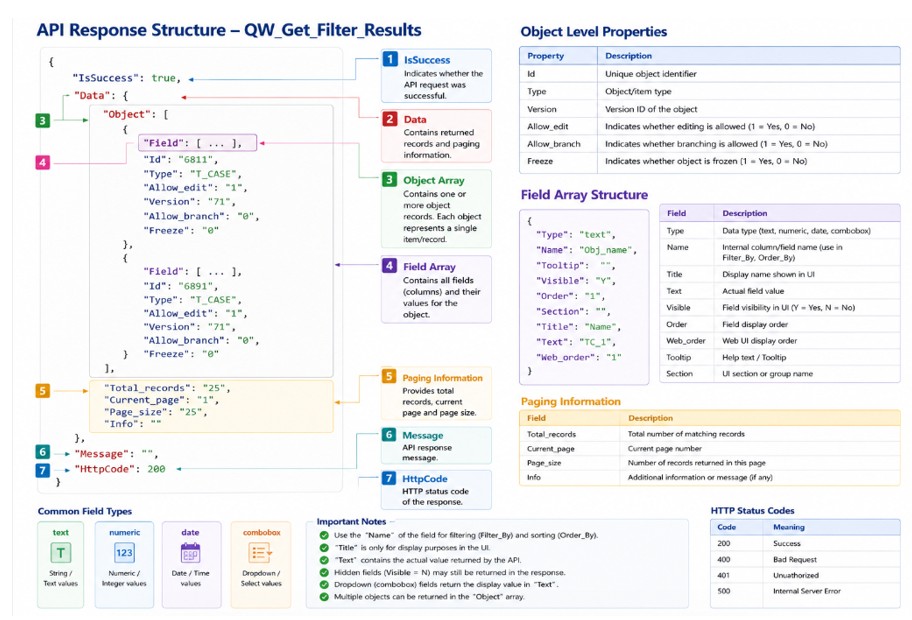
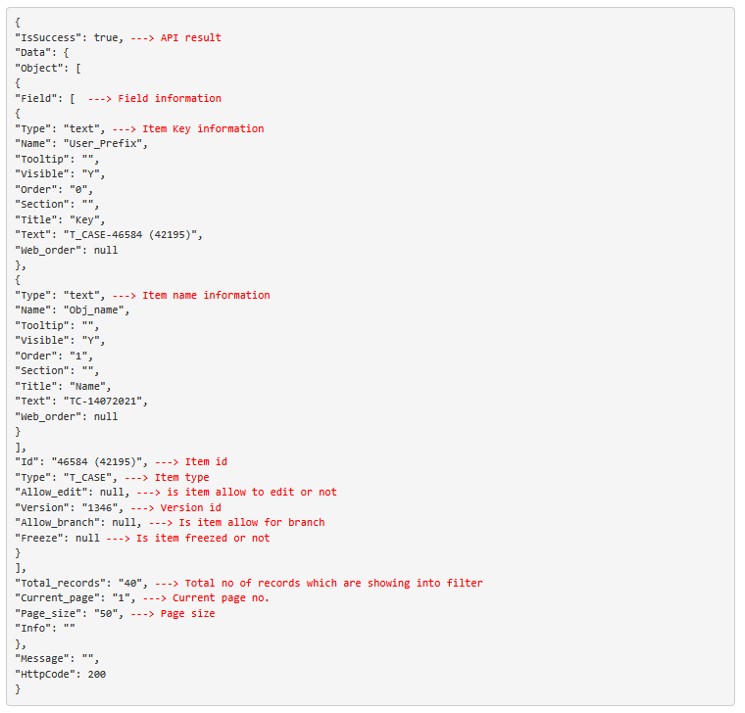
OVERVIEW
This REST API returns the full details about the filter.
Method: Post
Input:
Authorization: Using an API key in the Request Headers. For more information, please refer to our Orcanos REST API article.
Request Body Parameters
| Parameter | Type | Example | Description |
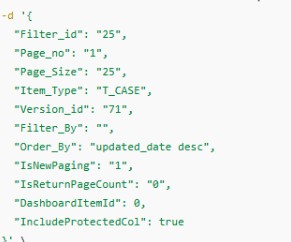
| Filter_id | string | “25” | Unique filter identifier used to retrieve filter results. |
| Page_no | string | “1” | Specifies the page number for paginated results. |
| Page_Size | string | “25” | Number of records returned per page. |
| Item_Type | string | “T_CASE” | Defines the workitem type or item type for which records are requested. |
| Version_id | string | “71” | Specifies the version ID used to fetch data. |
| Filter_By | string | “Obj_name like ‘%test%’” | Additional SQL-like filter conditions applied to the results.
|
| Order_By | string | “updated_date desc” | Sorts the returned records based on the specified column and order.
SQL like order-by clause
|
| IsNewPaging | string | “1/0” | Enables the new paging logic when set to 1. (Keep it 1) |
| IsReturnPageCount | string | “1/0” | Determines whether total page count information should be returned.
1 -> Return only total number of records 0-> will return actual filter results |
| DashboardItemId | integer | 123(Not Relevant for API Users
) |
Dashboard item identifier used for dashboard-specific requests.
This is dashboard item id where filter is used |
| IncludeProtectedCol | boolean | true/false | Includes protected columns in the response when set to true. |
Example Request
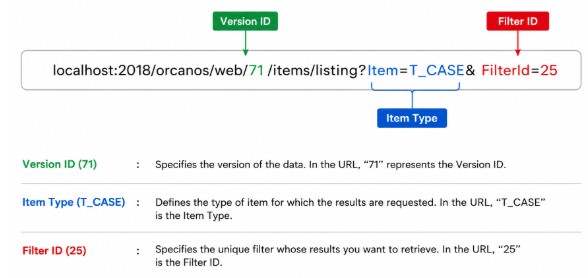
Filter_id / Version_id / Item_type (how to get from URL)
Order_By parameter
SQL-like order by clause
Basic Syntax
ColumnName ASC|DESC
Sorting Direction
| Keyword | Description |
| ASC | Ascending order |
| DESC | Descending order |
Examples
- Obj_name ASC – Sorts records alphabetically from A to Z.
- Created_date DESC – Sorts records from newest to oldest.
- Priority DESC, Created_date ASC – Sorts by priority first and then by created date.
- CS95 ASC – Sorts using custom field CS95.
Important Notes
- Do not include the words ORDER BY.
- Use database/internal column names only.
- Multiple columns should be separated using commas.
- ASC is optional because ascending order is usually the default.
- Invalid column names may return SQL or API errors.
Example API Request
{“Order_By”: “Updated_date DESC”}
Filter_By parameter
The Filter_By parameter is a dynamic WHERE clause used to filter records returned by the webservice.
It behaves similarly to a SQL WHERE condition without writing the word WHERE.
Standard Format
- ColumnName [Operator] Value
ColumnName
- ColumnName refers to the internal database field name used by the system to store data.
- The values shown in the Column Name column should be used in the Filter_By parameter when applying filters.
- Get from Admin->Fields Management
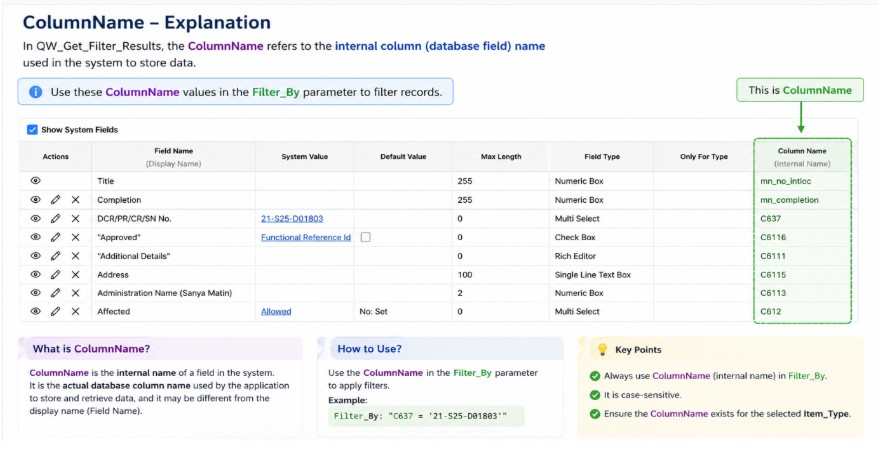
- Few main System Field ColumnName
| Assigned To | Assigned_to |
| Category | Obj_category |
| Due Date | Due_date |
| Effort Estimation | Effort_estimation |
| Name | Obj_name |
| Priority | Obj_priority |
| Start Date | Start_date |
| Status | Obj_status |
| Version | Obj_version |
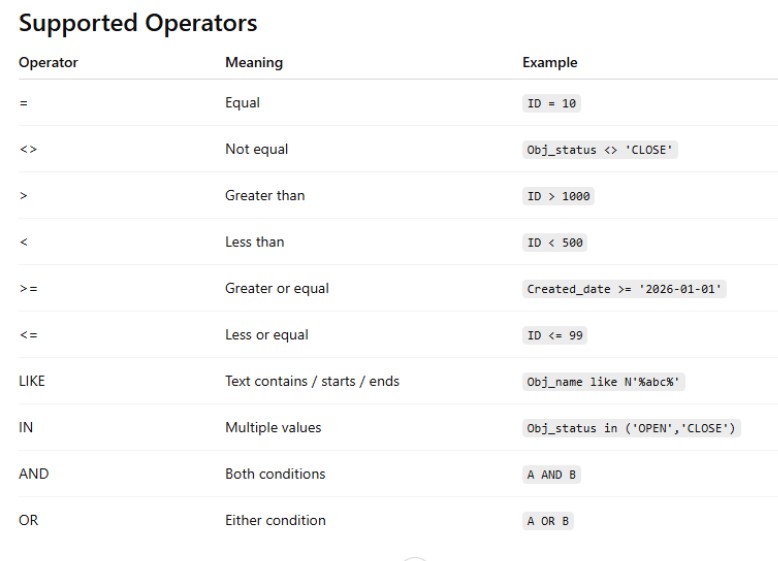
Operators
- In the Filter_By parameter, an Operator defines the condition used to compare a column value with another value.
- Operators are used between the ColumnName and the value in a filter condition
Value
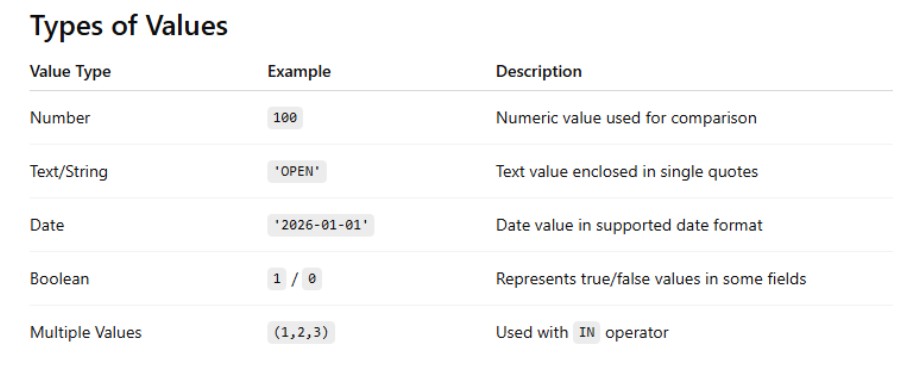
- In the Filter_By parameter, the Value is the data being compared against the ColumnName using an Operator.
- It is the actual value used for filtering records.
- Multiple ValueExample
- CS101 IN (1,2,3)
- Date Value Example
- Created_date >= ‘2026-01-01’
- Numeric Value Example
- CS101 >= 10
- String Value Example
- CS313 = ‘New York’
- CS313 = ‘New York’
- Text/string values must be enclosed in single quotes (‘ ‘).
- Numeric values usually do not require quotes.
- Date values should be passed in a valid date format.
- The value format should match the column data type.
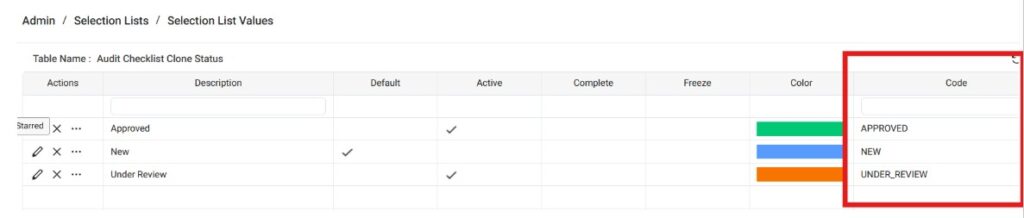
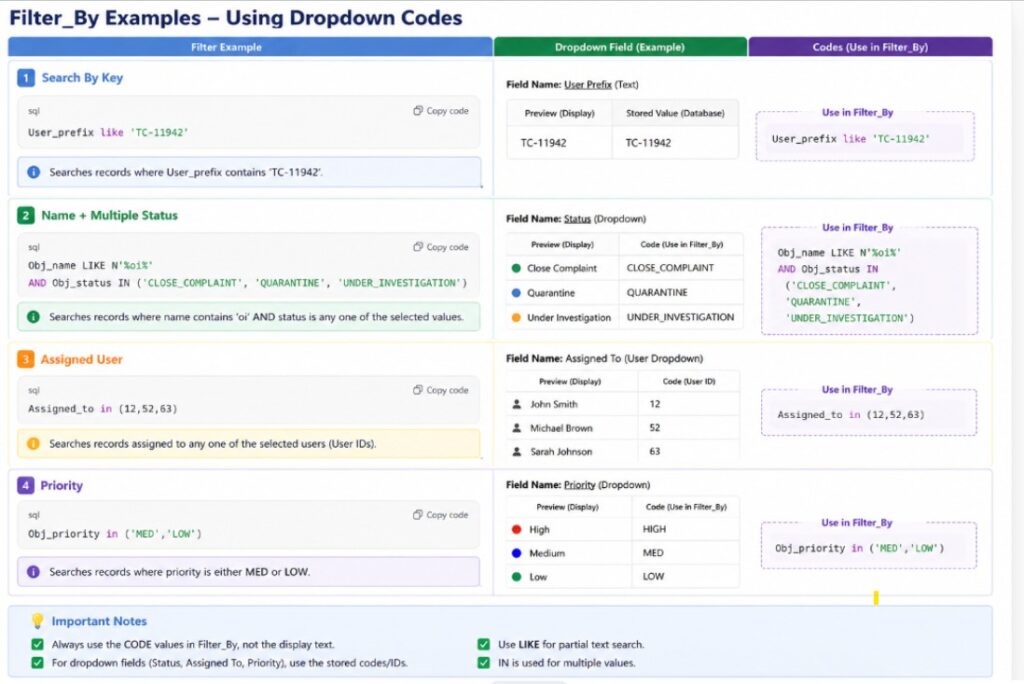
- For dropdown fields, use the stored code value instead of the display text
- Admin -> Selection Lists -> Selection List Values
Filter_By Examples
- Search By Key
- User_prefix like ‘TC-11942’

- User_prefix like ‘TC-11942’
- Name + Multiple Status
- Obj_name LIKE N’%oi%’ AND Obj_status IN (‘CLOSE_COMPLAINT’, ‘QUARANTINE’, ‘UNDER_INVESTIGATION’)
- Assigned User
- Assigned_to in (12,52,63)
- Priority
- Obj_priority in (‘MED’,’LOW’)
- Custom Field Filter
- (CS95 IN (‘TEST_CATEGORY_1′,’TEST_CATEGORY_2’))
- Obj_name LIKE N’%pump%’ AND Obj_status IN (‘OPEN’,’WAIT’) AND Obj_priority IN (‘HIGH’) AND Assigned_to IN (‘5’)
- Unicode N
- Obj_name LIKE N’%שלום%’
- Obj_name LIKE N’%测试%’
- Embed Filter [$ME] will refer current id of workitem in which embed filter is used
- ID IN ( SELECT Item FROM fnGetAllChildren([$ME] , Version_ID))
- Exec_id IN ( SELECT * FROM fnGetAllChildren([$ME], [QMVI]) )
API Output