OVERVIEW
This REST QW_Add_Object API facilitates the seamless addition of objects( Work Items).
Method: Post
Input:
Authorization: Using an API key in the Request Headers. For more information, please refer to our Orcanos REST API article.
Post body:
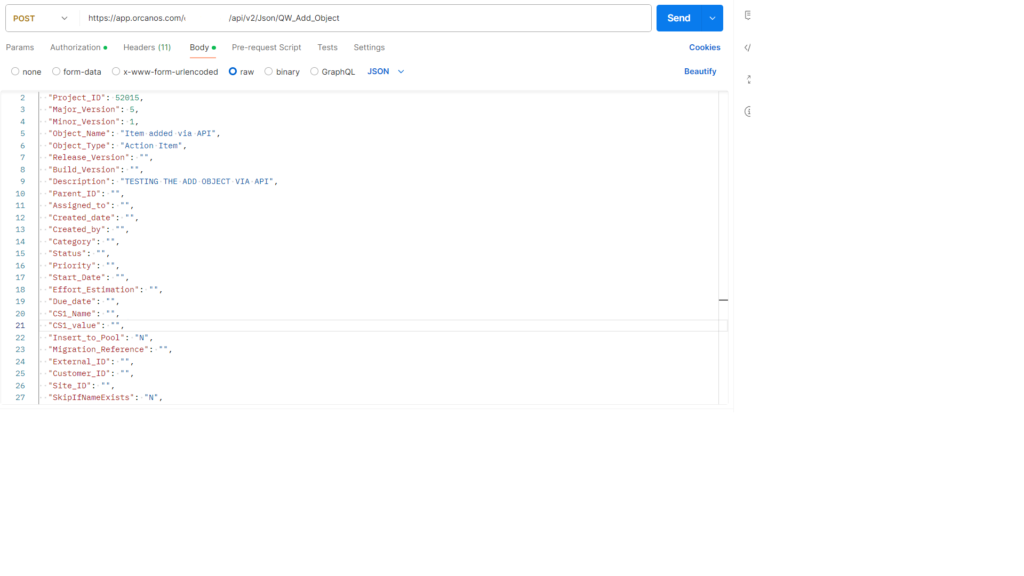
Purpose of Fields given in this API:
| Parameter | Value | Mandatory | Description |
| Project_ID | String | Yes | Project ID |
| Major_Version | Int | Yes | The major version view number as appears in Orcanos |
| Minor_Version | Int | Yes | The Minor version view number as appears in Orcanos. |
| Object_Name | String | Yes | The item name which user wants to put |
| Object_Type | String | Yes | The item name example: Action Item, Risk, Requirement etc |
| Release_Version | String | No | Release value (major.minor.RELEASE.build) Default is 0 |
| Build_Version | String | No | Build value (major.minor.release.BUILD) Default is 0 |
| Description | String | No | Item description in plain text/HTML format |
| Parent_ID | String | No | Input the parent item id where item will be created under. Default value will be the input project |
| Assigned_to | String | No | User name the item should be assigned to. User must belong to project.
Default is the default assigned user in status workflow |
| Created_date | String | No | The item created date.
Format must be the date format of the local machine Default is Current date & time |
| Created_by | String | No | The name of the user created the item.
Default is the user that calls the service. |
| Category | String | No | Item category.
Default is category default value (Taken from admin system tables) |
| Status | String | No | Item status.
Default is status default process flow value (Taken from admin system tables) |
| Priority | String | No | Item priority.
Default is priority default value (taken from admin system tables) |
| Start_date | String | No | The item start date.
Format must be the date format of the local machine Default is Current date & time |
| Effort_estimation | String | No | Item effort estimation.
Default is 0 |
| Due_date | String | No | The item due date.
Format must be the date format of the local machine Default is Current date & time |
| CS1_Name | String | No | Item 1st custom field name |
| CS1_value | String | No | Item 1st custom field value |
| Upto CS60_Name | String | No | Upto item 60th custom field name |
| Upto CS60_value | String | No | Upto item 60th custom field value |
| Insert_to_Pool | String | Yes | For change requests/requirements only: Determine whether item is inserted to pool (value=Y) or to product tree (value=N)
Default: N |
| MigrationReference | String | No | For each item inserted, you can add a reference string. Later on you will be able to use this reference in reports, or in order to delete group of items – you will be able to delete a group of items by the migration reference string |
| External_ID | String | No | If the item source is from 3rd party system. You can add the ID from the 3rd party system for later use. |
| Customer_ID | String | No | Enter the customer id if required |
| Site_ID | String | No | Enter the site id if required |
| “SkipIfNameExists”: |
String | No | With this parameter (Value=Y), if an object with the exact same Object_Name exists, the function will not create a duplicate object. Instead, it will return the original object ID, just like when the first object with that name was created. |
Output:
Orcanos Output class:
IsSuccess: if successful then true else false
Data: Updated or Newly created object id
Message: Error message in case IsSuccess is false
HttpCode: Response HttpCode