OVERVIEW
The Search feature in Orcanos allows users to find specific items across the platform.
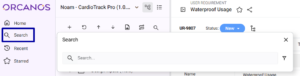
Search is conveniently accessible in the sidebar.
You can also access it using the keyboard shortcut ‘/‘.
HOW TO PERFORM SEARCH
- Input at least 2 characters in the search field.
- Click the search icon or press Enter Key to begin the search.
- To narrow down your search, select specific item types using the filter next to the search box.
The Search is based on Item Name, Item Key or Item Description
The search results are displayed in a grid if multiple items match the query. If only one item matches, it automatically opens in a new tab.
Items appear as many times as the project or solution active version exists in the search results grid.
Use the Filter icon to multi-select specific work items.
ACTION ICONS IN THE SEARCH GRID
- Locate in Product Tree: Opens the items in the product tree.
- View: Opens the overview page of the selected item.
- Edit: Opens the selected item in edit mode for modifications.