Add Traceability Options allows the user to set up traceability for Single/Multiple Items.
Relations can be set up in the same project or Different Project.
Add Traceability Option is not applicable for Defects Work Item
HOW TO ADD TRACEABILITY
- Choose the module from the sidebar, then select the project from the project selector drop-down list at the top of the left pane (if applicable) and click the List View icon.
- Select the Required Work Item
- Select the Single/multiple Items by checking the Checkbox in the Work Item Grid
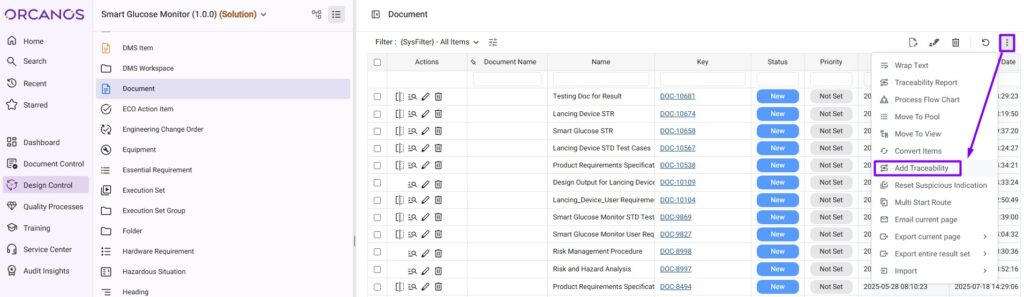
- Select the Add Traceability option from More Actions Icon
- Select the Required Project in the Add Traceability pop-up window
- Select the Target Node in the Selected Project Product Tree
Make sure the Traceability Setup is Defined between the Selected Work Item and the Target Node Selected
All the Selected Items in the Work Item Grid got linked with the Selected Target Node of the Project.